How to Buy Ethereum in 2026: Card Purchase to Your Wallet
Learn how to buy Ethereum by card, compare the real all-in cost, and send ETH to your own wallet on the right network safely.
The usual advice on how to buy Ethereum is to choose a platform, enter an amount and press Buy. That skips the decision that can turn a cheap purchase into an expensive one: where will your ETH arrive? A low purchase fee doesn't help much if the provider adds a spread, charges heavily for withdrawal or sends funds to a network your wallet can't use.
Treat the purchase as two separate costs: acquiring ETH and getting it into a usable wallet on the right network. Choose the destination before paying, compare the final ETH delivered and test the route before committing your planned amount.
Compare Payment Routes and Real Costs
Payment routes and their typical costs
| Route | Typical fee | Best for |
|---|---|---|
| Card purchase via simple buy | About 1.5% to 2.0% convenience fee | First small purchase, with straightforward checkout |
| Exchange purchase | About 1% to 1.5% or more, plus any quoted spread | Larger amounts when the final quote is competitive |
| Bank transfer | Provider's bank-funding charge and purchase fee, shown before confirmation | Buyers without a card who can wait for bank processing |
| Apple Pay or Google Pay | Fee set by the checkout provider | Fast checkout on a phone |
| Withdrawal to wallet on Ethereum mainnet | About $0.01 to $0.50 when calm, before any additional provider charge | Moving ETH to self-custody |
The fee estimates in Yahoo Finance's Ethereum buying guide put simple-buy convenience fees at approximately 1.5% to 2.0%, exchange purchase fees at about 1% to 1.5% or more, and ordinary wallet-transfer costs at approximately $0.01 to $0.50. These are estimates, not a live tariff or a guarantee of what an exchange will charge to withdraw.
A card can be the simplest route for a small first purchase. An exchange order can suit a larger purchase, but only if its funding, trading and withdrawal costs produce a better final result. A bank transfer may require waiting for funds to become available; quick card authorization also doesn't necessarily mean immediate crypto delivery.
Compare delivered ETH, not the button price
A spread is the difference between the market price and the price used for your purchase. A checkout can advertise a low commission while giving you less ETH through its exchange rate. Conversely, a visible fee can accompany a more competitive quote.
Our basic purchasing flow doesn't require an account: you enter the amount, supply your wallet address and complete payment. NexaPay Instant accepts Visa, Mastercard, American Express, Apple Pay and Google Pay, with payment availability determined by the provider and region.
Before paying, compare:
- Quoted ETH price: Check the exchange rate used, not just the displayed market price.
- Fee type: Identify the payment charge and purchase commission.
- Spread: Compare the ETH offered for the same cash amount.
- Withdrawal charge: Separate the provider's charge from network gas.
- Network fee: Confirm whether it's included or deducted from delivery.
Buying rule: Compare quotes for the same spending amount and destination network. Otherwise, you're comparing different services.
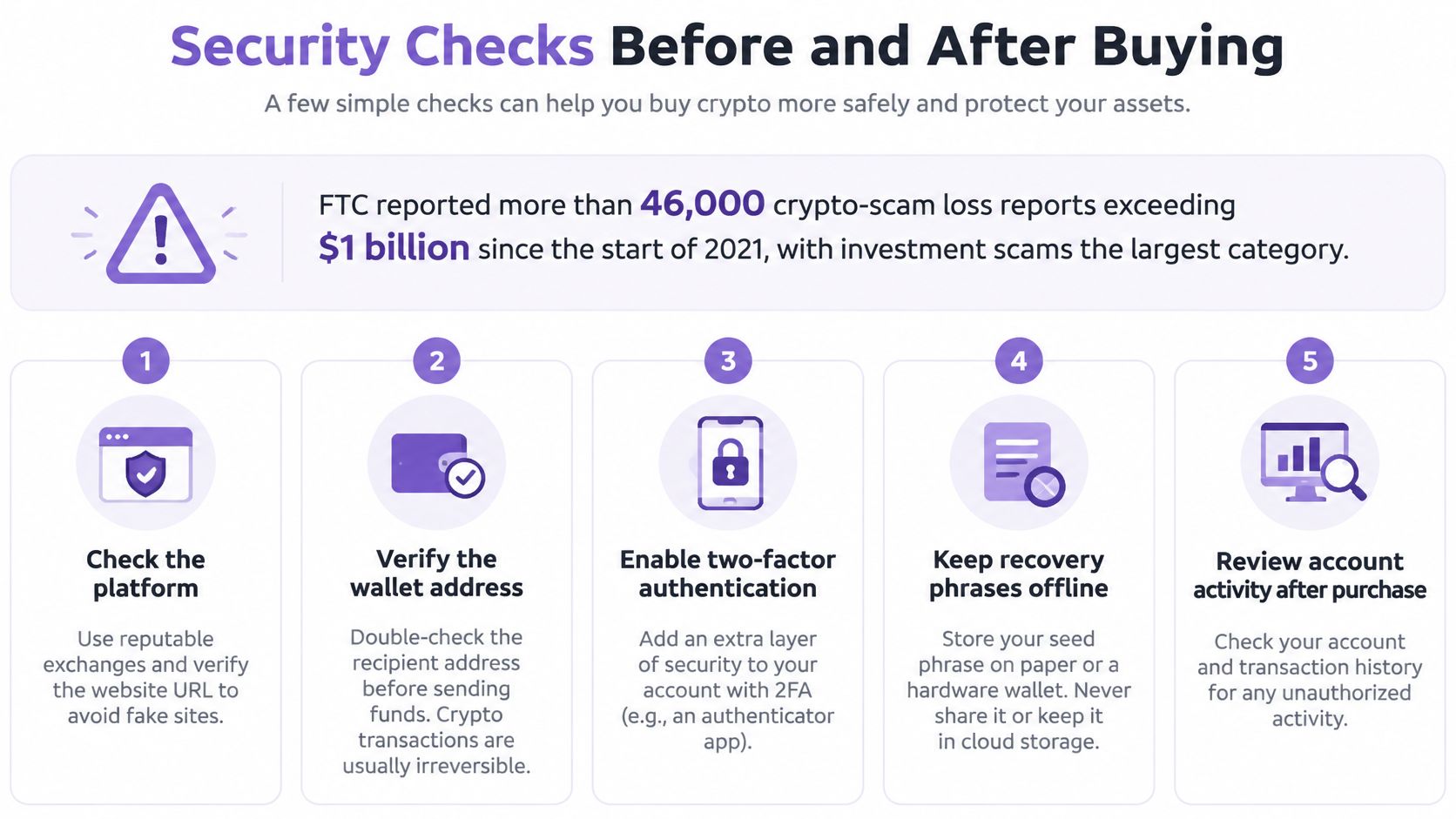
Security Checks Before and After Buying
A polished checkout does not make an offer safe. The SEC's investor alert on crypto asset securities treats promises of high returns with little or no risk as a classic fraud warning sign, so guaranteed profits, pressure to act now, or a stranger offering to handle the purchase in private messages should end the transaction.
Buying ETH raises two security questions: whether the purchase is legitimate, and whether the ETH will land in a wallet you control on the network you intended. A cheap quote fails if delivery goes to the wrong address, the provider keeps custody when you expected withdrawal, or access to your money depends on another payment later.
Keep these checks beside you during checkout and wallet setup.
Separate the risks before paying
Price risk, counterparty risk and fraud risk are different problems. A legitimate provider cannot stop ETH from falling, and a rising ETH price does not make an unknown seller trustworthy.
- Verify the service: Open the provider's verified domain or official app yourself. Don't submit identity documents through a support message or an unsolicited advertisement.
- Set a loss limit: Use money you can afford to lose entirely. Staged purchases can reduce dependence on a single entry price, but they don't remove investment risk.
- Check custody: Know whether the provider holds your ETH or delivers it to a wallet you control. Crypto holdings generally don't receive FDIC or SIPC insurance.
- Confirm withdrawal terms: Before paying, know whether ETH arrives at your external wallet directly or sits in a provider balance until you request a payout.
Protect access after delivery
For any account involved, use a unique password and phishing-resistant or app-based multifactor authentication. Enable withdrawal-address whitelisting where available, and review account activity after the purchase.
For significant long-term holdings, consider a hardware wallet. Follow its official setup instructions and test recovery offline before transferring a substantial balance. Don't photograph the recovery phrase or enter it into a website that claims to validate your wallet.
An unfamiliar smart-contract approval is another warning sign. Receiving a normal ETH transfer doesn't require you to grant a stranger permission to spend your assets, and a demand for an extra payment to access profits can signal a recovery scam.
No legitimate buying service needs your seed phrase, remote access to your screen, or a second payment to release money already yours.
Choose Mainnet or a Layer 2 Network
Network choice, transfer cost and best use
| Network | Typical transfer cost | Wallet compatibility | Best use |
|---|---|---|---|
| Ethereum mainnet | About $0.078 per transfer in the cited comparison | An Ethereum-mainnet-capable wallet | Large holdings and mainnet-only apps |
| Base | About $0.0015 per transfer in the cited comparison | Needs a wallet that supports Base | Small payments and frequent transfers |
| Arbitrum and Optimism | Individual costs aren't covered by this comparison | Needs a wallet that supports each network | Check the network's details before sending |
The Layer 2 fee analysis reports approximately $0.078 on Ethereum mainnet versus $0.0015 on Base, making mainnet about 52 times more expensive in that comparison. Those observations aren't current withdrawal quotes, and a provider may charge more than the underlying transaction cost.
The useful conclusion isn't that you should always choose Base. It's that the cheapest place to buy ETH isn't necessarily the cheapest place to own and use it.
Match the network to the job
Mainnet can make sense when you want to keep holdings on Ethereum itself or use an application that operates there. Paying more for a transfer may be acceptable if it avoids moving assets between networks later.
A Layer 2 can suit frequent transfers, small payments and applications that support it. But cheaper transactions aren't useful if your intended recipient, application or purchasing provider doesn't support that network.
Be precise about the asset, too. ETH is native to Ethereum; Layer 2 balances and bridged representations follow that network's arrangements, while wrapped ETH is a separate token representation. Don't assume that ETH, wrapped ETH and every bridged version are interchangeable in a checkout or application.
Our asset listing identifies ETH as Ether on Ethereum. It separately identifies USDC as USD Coin on Polygon or Ethereum, and POL as Polygon on Polygon. That listing isn't a promise of ETH delivery on Base, Arbitrum or Optimism.
An address alone doesn't identify the chain
The same address format can appear across Ethereum-compatible networks. That doesn't mean every wallet interface or custodial deposit service supports funds received on all of them.
Confirm the receiving wallet supports the selected network, and keep enough ETH there for future gas. An ETH balance on mainnet doesn't automatically pay a transaction fee on Base.
Choose the network first. Then match the provider's delivery network, the wallet's receiving instructions and the block explorer used to verify arrival.
How to Enter Your Amount and Pay for ETH
The purchase form is straightforward, but its currency, asset and destination fields each control something different. Complete them deliberately rather than treating saved checkout settings as correct.
Use this purchase-flow visual as a quick reference.
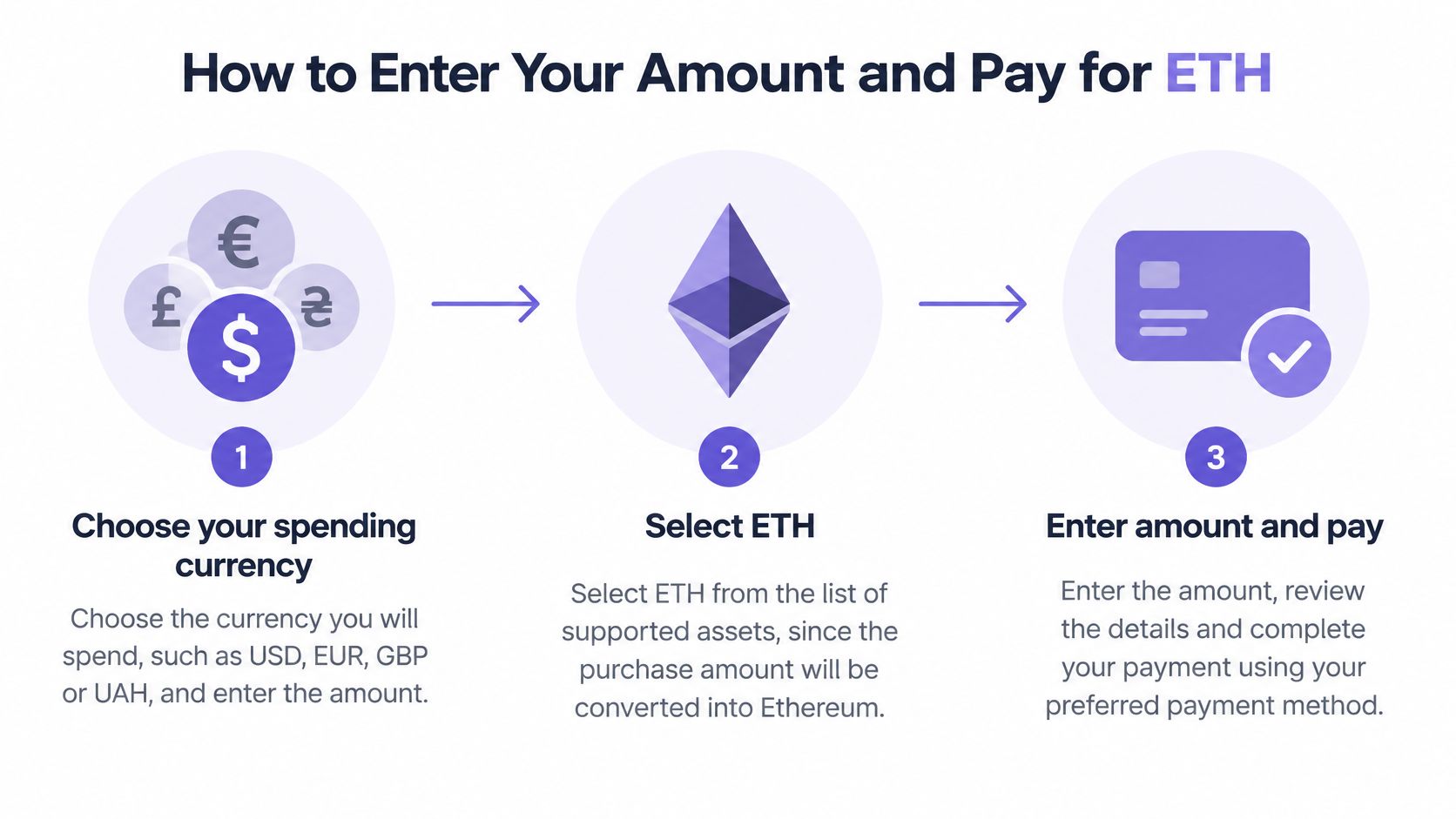
Choose your spending currency and amount. Our purchase flow starts with an amount in USD, EUR, GBP or UAH. Check the currency selector before typing, especially if the form remembers a previous session.
Select ETH. Our supported assets include Bitcoin, Ethereum, USDT, USDC and Solana, so don't assume the default selection is Ethereum. Read the asset name and network together.
Choose an available payment method. Our payment flow includes credit card, Apple Pay, Google Pay, Revolut or PayPal, subject to provider and regional availability. A method appearing elsewhere on the website doesn't guarantee it will be offered for your order.
Enter the external receiving address. First select the intended network in your wallet, then copy its receiving address into checkout. Don't paste a Solana address; if you use an exchange deposit address, verify that the exchange explicitly accepts ETH through the selected network rather than assuming it's equivalent to your own wallet.
Review the quote before confirming payment. Read the expected ETH delivery amount, exchange rate and listed charges. The amount you enter is your gross spending amount, not necessarily the value of ETH that reaches your wallet.
Save the receipt and order reference. Keep the payment confirmation and delivery details together. They'll help you distinguish a payment issue from a blockchain-delivery issue if something doesn't match.
Translate fees into a spending decision
Estimated purchase fee by amount spent
| Amount spent | Estimated fee at the illustrative rate |
|---|---|
| $100 | $1 to $2 |
| $500 | $5 to $10 |
| $1,000 | $10 to $20 |
This table illustrates the purchase-fee range used above, before withdrawal and network costs. It's a calculation, not our price list, and it doesn't establish how much ETH you'll receive.
Basic purchases don't require an account, but the payment provider can still request identity checks according to the transaction and region. No account required doesn't mean no verification required.
For a visual walkthrough of the purchasing process, use the video below.
A completed order should leave you with a receipt matching your spending amount and a delivered ETH amount consistent with the accepted quote and disclosed deductions. Payment approval alone isn't proof that the wallet has received it.
Send ETH to Your Wallet and Confirm a Test Purchase
Treat the first purchase as a test of the complete route, not just the payment button. You're checking whether your payment method works, whether the provider delivers to the intended chain and whether you can independently verify the result.
Our purchasing service delivers crypto directly to an external wallet. If you buy through an exchange instead, purchasing and withdrawing may be separate actions, so an exchange balance isn't yet proof that your self-custody setup works.
Run the delivery check in sequence
Start with a small test purchase. Choose an amount you're comfortable using to validate the route, while accounting for minimum purchase and withdrawal requirements. Don't commit your full planned position just because checkout accepts the card.
Match the delivery network to the receiving wallet. Read the actual network selection on the withdrawal or purchase screen. If the order specifies Ethereum mainnet, don't interpret that as delivery to an arbitrary Ethereum-compatible network.
Copy the address from the wallet itself. After pasting, compare the beginning and end, then check the entire address against the wallet display before approval. If you use a hardware wallet, verify the receiving address on the device when supported.
Approve delivery and retain the transaction hash. Keep it alongside the order reference, not instead of it. The order reference identifies the provider's record; the transaction hash identifies the on-chain transaction.
Open a public block explorer for the selected network. Paste the transaction hash into its search field and inspect the status, destination and transferred amount. A mainnet explorer won't provide the same transaction history as a Base explorer.
Reconcile the result with your receipt. Compare the delivered ETH with the provider's confirmation, including any disclosed deduction. Check the actual incoming transaction rather than relying only on the wallet's changing cash-value display.
Blockchain transfers generally can't be reversed by a payment provider. A wrong address or unsupported destination network can leave you dependent on technical recovery steps, and recovery may not be possible.
Understand what gas does and doesn't explain
Ethereum's gas documentation explains transaction cost as gas used multiplied by the per-unit gas price, with a base-fee component and an optional priority fee. Network conditions can change before settlement, which is why an estimate isn't always the final charge.
That doesn't mean every difference between a quote and delivery is gas. A provider's spread, purchase commission and withdrawal policy are separate parts of the transaction. If the delivered amount is unexpectedly low, inspect those items before blaming network congestion.
Consider a hypothetical card buyer planning frequent small payments. A competitive acquisition quote that delivers only to mainnet may require another transfer or bridge before the ETH reaches the intended application. A route delivering directly to a supported Layer 2 could avoid that extra operation, but only if the provider offers it and the receiving wallet supports it.
Compare the complete route, including the next action you expect to take. Don't treat a low network fee as a guarantee of a low checkout total.
Calculate the real acquisition cost
Use this benchmark:
All-in acquisition cost = (cash debited − market value of ETH received) ÷ market value of ETH received
For a useful comparison, value the received ETH using a consistent market reference close to execution. If you compare against its value much later, price movement can overwhelm the fees you're trying to measure.
Your test passes when:
- Destination matches: The receiving address is the address you approved.
- Network matches: The transaction settled on the chain your wallet and intended use support.
- Delivery matches: The ETH received reconciles with the accepted quote and disclosed charges.
- Access works: You can see and control the balance through your wallet, not merely a provider's confirmation screen.
If the transaction is pending, check its status before trying again. If it has settled but the wallet doesn't display it, investigate the selected network and wallet configuration rather than sending more money.
Only proceed with the planned purchase after the test passes. For a larger position, staged purchases can keep the operational process manageable without turning a successful test into an assumption that every later order will have identical fees.
NexaPay lets you choose an amount, select ETH and pay using an available card or digital-wallet method, with delivery directly to your external wallet. Visit NexaPay to review your purchase options, confirm the Ethereum destination and start with a small test order before committing your planned amount.
Refined using Outrank tool